logo-ls, bat
A guide to beautifying ls and cat, two of my most frequently used terminal commands
Translated by Claude Opus 4.5
AI-generated content may be inaccurate or misleading.
When using the terminal, you might like the colorful and pretty aspects, but it can feel boring with just text. There are also some commands you wish could be a bit different... In this article, let's improve these aspects a little.
Installing logo-ls
logo-ls is an open-source program written in Go.
It's available on GitHub.
Unlike the boring ls command, it displays icons next to each file, making it look a bit prettier.

Installation is simple.
Just download and install the package file provided on the releases page.
However, depending on your situation, you may need to do something extra - install fonts.
If fonts aren't installed, you'll see question mark icons in squares. Choose and install a font from this site.
(Fira Code recommended)
After that, entering logo-ls should work well.
If you like it, try using an alias to make it run automatically when you type ls. 
Installing bat
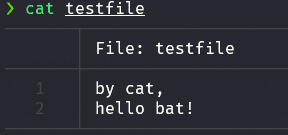
bat is a program created as a replacement for cat.
It outputs file contents almost identically to cat.
There's a slight difference though - it supports syntax highlighting.
I usually use cat to quickly check configuration files, and syntax highlighting support is really convenient.
There are slight differences between Linux distros, but it supports package managers for almost all distros.
Usually in the format apt install bat
You can check it on GitHub. After installation, use it the same way as cat.
Of course, you can also register it as an alias instead of cat.
(There's also talk of creating a symbolic link, but let's skip that for now)
Conclusion
The more you use the terminal, the prettier it seems to get. I'm curious what convenience tools I'll discover next, and I'll post about any good information I find.
Published:
Modified: