How to Log Client IP Addresses in Backend Systems
Understanding X-Forwarded-For headers and their security implications
Translated by Claude Opus 4.5
AI-generated content may be inaccurate or misleading.
You probably have at least one backend you've built yourself. In my case, I had api.tmpf.me, but there was one thing I felt was lacking.
That was user access logging.. - the work of recording users who access the service.
It might not be strictly necessary, but let's assume it is as we read this article.
First, there can be various infrastructure configurations. Among them, when the client and server communicate directly:
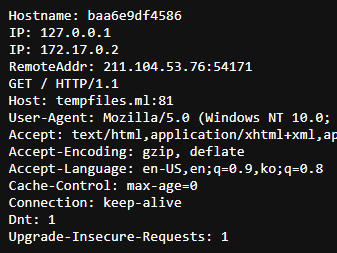
This can be handled very simply. Just parse and use the RemoteAddr field.
As shown in the image below, 211.104.53.76 is the client's IP.
(My IP while writing this article)
Second case: When there's a proxy server between the client and server. In this case, there's something new you need to know - the X-Forwarded-For header.
This header is a de facto standard header created to pass the RemoteAddr (which would be lost when passing through proxies) to services behind the proxy.
The following screenshot shows a whoami service running behind 2 reverse proxies.
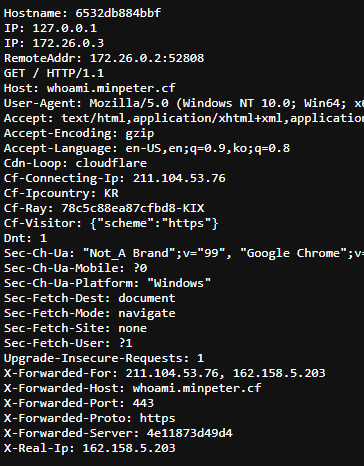
Looking closely, there are 2 places where the original client IP can be found: the Cf-Connecting-Ip field added by Cloudflare and the first value in the X-Forwarded-For field.
First, let's exclude Cf-Connecting-Ip since it only applies when using Cloudflare's Proxied records, and take a closer look at the X-Forwarded-For header below.
The first value is clearly the client IP. So what's the next value? It's the Cloudflare proxy server's IP, and the RemoteAddr (which was the client IP above) is the IP of traefik, the reverse proxy after Cloudflare.
The IPs differ from the image above, but it has the following structure:
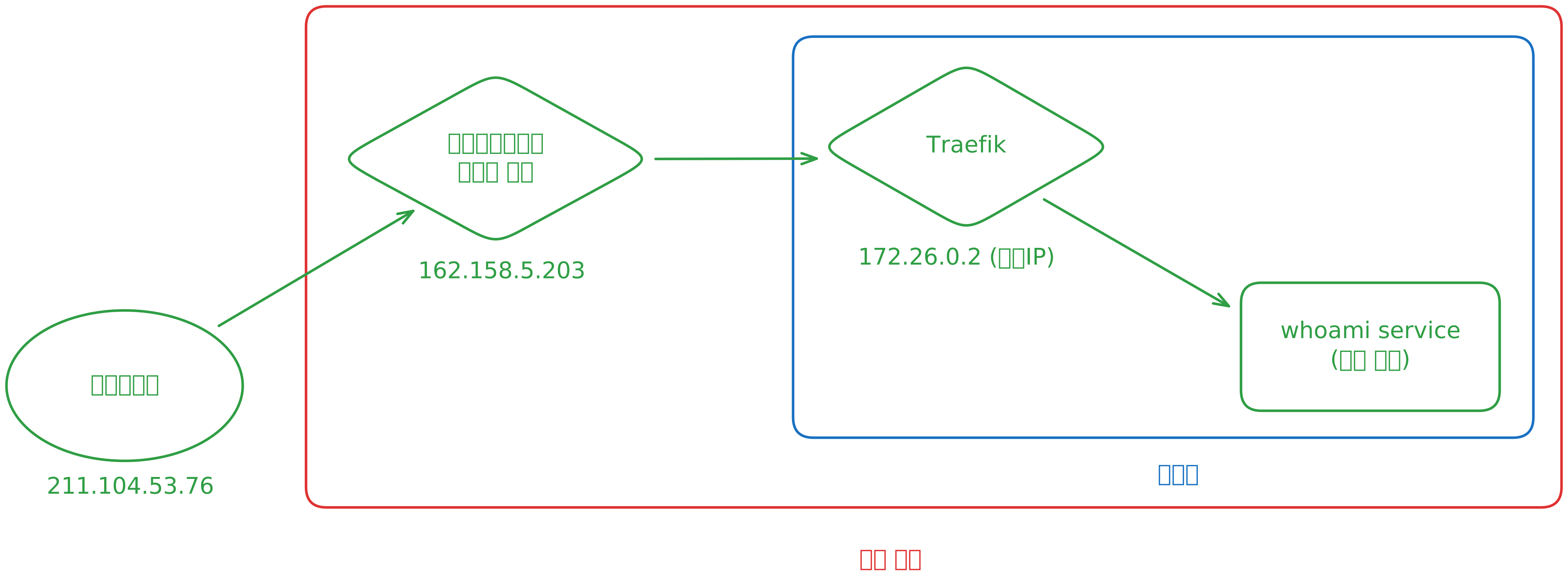
The X-Forwarded-For header works by appending the existing RemoteAddr to the X-Forwarded-For header when passing through each proxy, with the proxy server's IP becoming the RemoteAddr.
Therefore, in "most cases," the following logic successfully retrieves the client's IP:
forward := r.Header.Get("X-Forwarded-For")
  var ip string
  var err error
  if forward != "" {
    // With proxy
    ip = strings.Split(forward, ",")[0]
  } else {
    // Without proxy
    ip, _, err = net.SplitHostPort(r.RemoteAddr)
    if err != nil {
      http.Error(w, "Error parsing remote address ["+r.RemoteAddr+"]", http.StatusInternalServerError)
      return
    }
  }
But the logic above has one serious flaw.
Imagine using the IP obtained above for access control.
Whether the server has a proxy or not, the r.Header value is "from the user."
Also, X-Forwarded-For is just an HTTP header.
Headers can be easily manipulated.
If you "add" to the X-Forwarded-For header when initially sending, it gets transmitted in the following format:
X-Forwarded-For: <spoofed IP A>, <client's actual IP B>, <PROXY 1 C>
Of course, proxy C might not exist depending on the case, and the client's actual IP might be in RemoteAddr, but that doesn't matter.
According to the logic above, if the XFF header is set, read the first value of the XFF header. So the value added by the user spoofing becomes recognized as the actual IP.
This is a problem. Therefore, separate logic is needed to handle this... I found out how most production programs solve this problem.
Create a new setting value FORWARDED. This setting value is a number representing the following:
| Number | Meaning |
|---|---|
| 0 | No reverse proxy, uses RemoteAddr. |
| 1 | 1 reverse proxy in front of the service, uses the -1st value of XFF header. |
| .. | .. |
| 3 | 3 reverse proxies in front of the service, uses the -3rd value of XFF header. |
| 4 | 4 reverse proxies in front of the service, uses the -4th value of XFF header. |
| .. | .. |
This way, even if users manipulate the header value, requests exceeding the setting value are simply ignored, so it's not affected.
For example, if traffic reaches the service through Cloudflare and traefik, set the FORWARDED environment variable to 2 and use the -2nd value of the XFF header array. This means values arbitrarily added by users are ignored.
But as mentioned earlier, this method isn't perfect. Because an additional setting value was added, it's impossible to adapt and serve in all environments.
Warning: The content below is interesting but not organized. tl;dr
- The FORWARDED environment variable is actually a pretty good approach. Recommended.
- There's also a method of trusting only IP ranges of proxies in XFF headers.
- Don't trust XFF headers as they can be manipulated.
Somehow I ended up using Burp Suite to attack my own site, re-verify the code, and check parts that could easily be overlooked.
How is this problem known?
I found the following resources, among which some were interesting:
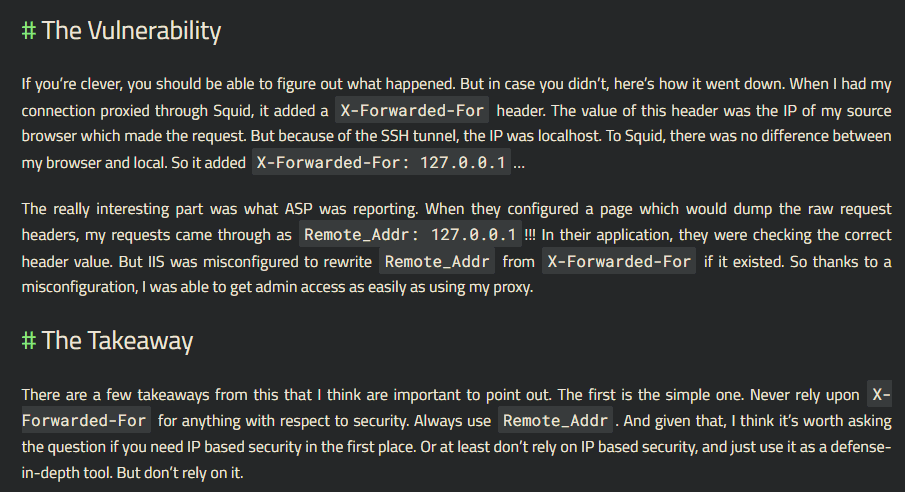
https://blog.ircmaxell.com/2012/11/anatomy-of-attack-how-i-hacked.html
In short, the author accidentally had 127.0.0.1 in the XFF header due to an SSH tunnel, and Stack Overflow recognized this as "admin" access, causing privilege escalation.
I also found this resource:
https://www.acunetix.com/vulnerabilities/web/x-forwarded-for-http-header-security-bypass/
XFF HTTP header security bypass, Classification number CWE-289
Some cases like CTFd had logic to limit proxy hops for prevention, but privilege escalation even happened on Stack Overflow, making this quite an interesting technique.
Since it's interesting, let's go further and attack and analyze IP logging methods in other services.
First is ifconfig.me.
I chose it because it's a service I use frequently.
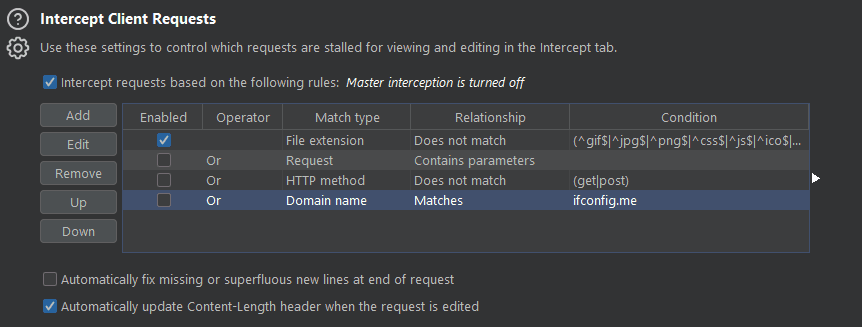
I selected proxy option and proceeded with intercept as shown.
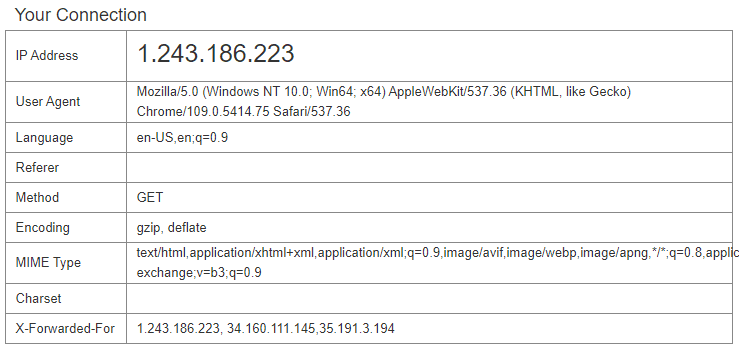
This is the response without any manipulation.
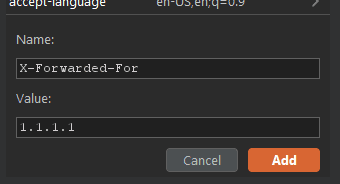
I forcibly added values to the request header.
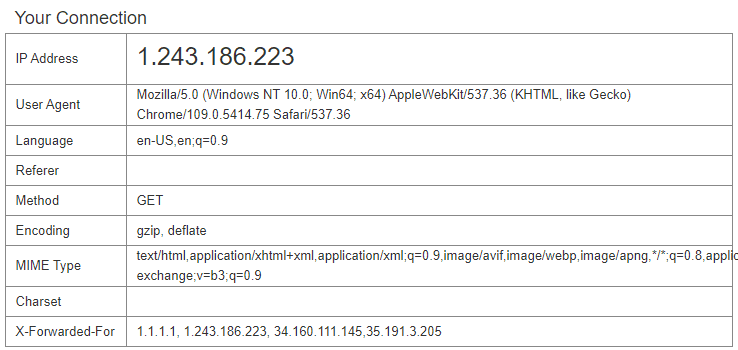
The value was clearly manipulated.
So how does ifconfig.me determine the client IP?
I found the repo on GitHub.
GitHub - pmarques/ifconfig.me: Simple HTTP application for demos and tests
I thought it was this, but it turned out to be a different service...
After running it locally, I thought "this isn't it."
They didn't even guard against this bypass, and honestly, there's no need to.. it's just for display ~
Actually, there were various repos created under the title "A IP echo server inspired by http://ifconfig.me". I grabbed the IP acquisition logic from a few repos:
ip := this.GetString("ip", this.Ctx.Input.IP())Here, the this variable was a router parameter from the beego library.
I found something interesting.
Security issue: Trusted Reverse Proxy and X-Forwarded-* headers - Issue #4589 - beego/beego
This is an issue about the exact problem I'm trying to solve.. but it was just closed.
This means most golang backends written with beego, using logic like Stack Overflow mentioned earlier, can be easily hacked.
// IP returns request client ip.
// if in proxy, return first proxy id.
// if error, return RemoteAddr.
func (input *BeegoInput) IP() string {
	return (*context.BeegoInput)(input).IP()
}
I extracted the current code implementation and comments from beego's develop branch.
Hmm.. guessing from comment #2: "We'll just blindly grab the first XXF value, good luck"

Next is the implementation of (*context.BeegoInput)(input).IP():
https://github.com/beego/beego/blob/031c0fc8af57ea1a18e21fd5a7a8e6f23c26bbea/server/web/context/input.go partial code:
// IP returns request client ip.
// if in proxy, return first proxy id.
// if error, return RemoteAddr.
func (input *BeegoInput) IP() string {
	ips := input.Proxy()
	if len(ips) > 0 && ips[0] != "" {
		rip, _, err := net.SplitHostPort(ips[0])
		if err != nil {
			rip = ips[0]
		}
		return rip
	}
	if ip, _, err := net.SplitHostPort(input.Context.Request.RemoteAddr); err == nil {
		return ip
	}
	return input.Context.Request.RemoteAddr
}
This implementation seems strange...
As a last hope, let's look at the input.Proxy() implementation:
// Proxy returns proxy client ips slice.
func (input *BeegoInput) Proxy() []string {
	if ips := input.Header("X-Forwarded-For"); ips != "" {
		return strings.Split(ips, ",")
	}
	return []string{}
}
Yikes...
I'm not sure this is the right implementation.
At this point, I could quietly open an issue... but let's first search how beego uses the IP() implementation internally.
server/web/error.go
"AppError":      fmt.Sprintf("%s:%v", BConfig.AppName, err),
"RequestMethod": ctx.Input.Method(),
"RequestURL":    ctx.Input.URI(),
"RemoteAddr":    ctx.Input.IP(),
"Stack":         stack,
"BeegoVersion":  beego.VERSION,
"GoVersion":     runtime.Version(),
This isn't RemoteAddr. This allows error logs to be spoofed.
server/web/server.go
record := &logs.AccessLogRecord{
RemoteAddr:     ctx.Input.IP(),
RequestTime:    requestTime,
RequestMethod:  r.Method,
Request:        fmt.Sprintf("%s %s %s", r.Method, r.RequestURI, r.Proto),
Same issue here.
server/web/router.go
if p.cfg.RunMode == DEV && !p.cfg.Log.AccessLogs {
		match := map[bool]string{true: "match", false: "nomatch"}
		devInfo := fmt.Sprintf("|%15s|%s %3d %s|%13s|%8s|%s %-7s %s %-3s",
			ctx.Input.IP(),
			logs.ColorByStatus(statusCode), statusCode, logs.ResetColor(),
			timeDur.String(),
			match[findRouter],
Here, access logging in dev mode uses the problematic implementation.
Well, just don't trust access logging in beego...
Next, let's look at fiber and echo.
Someone added TrustedProxy functionality.
IP Address | Echo - High performance, minimalist Go web framework
The developers handled it well.
Conclusion
This is my conclusion.
Getting a "trustworthy" client IP in a backend that will be deployed universally, without separate configuration files for the developer, is difficult.
But there are several options to choose from:
- Trust only RemoteAddr and deploy the backend without a proxy
- Use the first XFF header value but in an untrusted state
- Set the number of proxies in the deployment environment as an environment variable to configure the number of trusted proxies. Configure to only read that many XFF headers.
- Set IP ranges of trusted proxies and use the closest untrusted XFF header IP
Options 3 and 4 require configuration files, but with proper configuration, you always get a trustworthy IP.
Option 1 is trustworthy but depending on the environment, might not be the client IP (when proxies exist).
Option 2 has high versatility but can be easily hacked.
There are other solutions too.
Assuming you use Cloudflare, you can use the Cf-Con... header or have the proxy in front of the server set an X-Real-IP value and trust that, among various methods.
Choices are always necessary, and when developing or using backend programs, you must analyze how the program was developed and verify if it's a trustworthy approach.
So how will I develop mine?
- Use XFF header
- Not blind trust, but trust local addresses and Cloudflare IPs
- Additional proxy option to use RemoteAddr
- Additional option to add trustworthy proxy addresses
- Additional option to trust based on proxy hop count only
But it's not over.
Due to WAF or unknown causes, XFF headers might be forcibly changed and fixed, so it's case by case...
Well, I'll have to reference this carefully when developing.
Q. There was once a strange case where XFF headers disappeared during infrastructure inspection, wasn't there?
What was the cause?
A. Foolishly, it was because of weird network issues from the overlay network settings in swarm that I set up trying to do orchestration.
It made me feel that technology adoption should be postponed without skilled engineers.
Q. You finally proceeded with the ipLogger project. What did you learn?
A. It seems many projects trust XFF headers, and some implementations were unstable.
Of course, the ipLogger project isn't perfect, but while creating it, I definitely learned about logging technology and techniques for getting the client's real IP.
Published:
Modified: