Writing HTTP Clients in Go
A guide to HTTP client implementation in Go
Translated by Claude Opus 4.5
AI-generated content may be inaccurate or misleading.
Go's HTTP Client
HTTP is a session-less protocol based on client-server architecture and operates at the application layer.
It uses TCP as its underlying transport protocol. *With the release of HTTP/3 in July 2021, HTTP now supports UDP as well as TCP.
Uniform Resource Identifier (URL)
An address-like identifier used by clients to find web servers and identify requested resources.
| Scheme | Authority | Path | Query Parameter | Query Parameter | Fragment |
|---|---|---|---|---|---|
| scheme:// | user:password@ | host:port/path | ?key1=value1 | &key2=value2 | #table_of_contents |
As shown in the table above, URLs on the internet typically contain at minimum a scheme and hostname.
The scheme tells the browser to use HTTPS, and requests the default resource at the path images.google.com.
Client Resource Requests
An HTTP Request is a message from a client to a server requesting a specific resource response.
HTTP consists of 4 parts: method, target resource, headers, and body.
The method indicates the client's intention for what to do with the target resource, and request headers contain metadata about the data being sent.
If you're sending an image in the body using the POST method, the Content-Length header will contain the byte count of the image.
The request body then transmits the image encoded in a network-suitable format.
Let's briefly send a request for Google's robots.txt file using the netcat command:
$ nc www.google.com 80
GET /robots.txt HTTP/1.1
The response looks like this:
HTTP/1.1 200 OK Accept-Ranges: bytes Vary: Accept-Encoding Content-Type:
text/plain Cross-Origin-Resource-Policy: cross-origin
Cross-Origin-Opener-Policy-Report-Only: same-origin;
report-to="static-on-bigtable" Report-To:
{"group":"static-on-bigtable","max_age":2592000,"endpoints":[{"url":"https://csp.withgoogle.com/csp/report-to/static-on-bigtable"}]}
Content-Length: 7240 Date: Sat, 16 Jul 2022 02:01:54 GMT Expires: Sat, 16 Jul
2022 02:01:54 GMT Cache-Control: private, max-age=0 Last-Modified: Wed, 13 Jul
2022 19:00:00 GMT X-Content-Type-Options: nosniff Server: sffe X-XSS-Protection:
0 User-agent: * Disallow: /search Allow: /search/about Allow: /search/static
Allow: /search/howsearchworks . . . (omitted)
From top to bottom: status line, series of headers, blank line separating the body, and the response body containing the robots.txt file.
Using Go's net/http package, you can create HTTP requests with just the HTTP method and URL.
Types of Request Methods
| GET | Requests a server resource. |
|---|---|
| HEAD | Requests headers containing resource information in case the resource is larger than expected. |
| POST | Used when adding a resource to the server. |
| PUT | Used to update or replace an existing resource on the server. |
| PATCH | Used to modify part of an existing resource on the server. |
| DELETE | Used to remove a resource from the server. |
| OPTIONS | Used to find out what methods exist for a specific resource on the server. |
| CONNECT | Requests HTTP tunneling from a web server or establishes a TCP session with a target destination to enable data proxying between client and destination. |
| TRACE | Asks the web server to echo the request without processing it. |
The methods above aren't mandatory for all servers to implement exactly, so some web servers may not implement them correctly. It's best to verify before use.
Server Response
Let's not bother memorizing everything. Just know 200, 404, and 403...
Hypertext Transfer Protocol (HTTP) Status Code Registry
Fetching Web Resources in Go
Go doesn't render HTML pages on screen like a browser does.
Let's now create requests and learn about minor mistakes that can occur on the client side.
Using Go's Default HTTP Client
The net/http package has a default client for making one-off HTTP requests.
For example, you can use the http.Head function to send a Head request to a given URL.
The following code retrieves time via a Head request and compares it with the computer's time:
package main

import (
	"net/http"
	"testing"
	"time"
)

func TestHeadTime(t *testing.T) {
	resp, err := http.Get("https://www.time.gov")
	if err != nil {
		t.Fatal(err)
	}
	_ = resp.Body.Close()

	now := time.Now().Round(time.Second)
	date := resp.Header.Get("Date")
	if date == "" {
		t.Fatal("no Date header received from time.gov")
	}
	dt, err := time.Parse(time.RFC1123, date)
	if err != nil {
		t.Fatal(err)
	}

	t.Logf("time.gov: %s (skew %s)", dt, now.Sub(dt))
}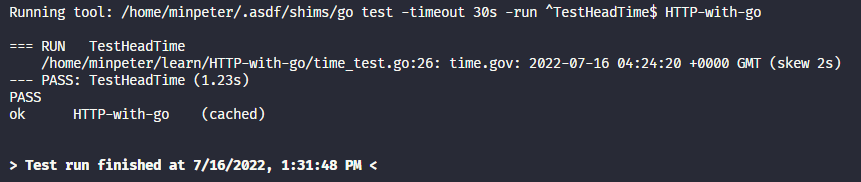
About 2 seconds difference can be observed.
Let's focus on 3 parts of the code above.
First, the resource request using the Http.Get function - Go's HTTP client automatically switches to the https protocol specified in the URL scheme.
Second, closing the response body - we'll soon learn why we must close it even if we don't read the response body.
Finally, after receiving the response, we get the Date header containing information about when the server generated the response. We can use this to compare with the computer's current time.
Closing the Response Body
HTTP/1.1 has a keepalive feature that allows clients to maintain TCP connections with servers for multiple HTTP requests. However, clients cannot reuse a TCP session if there are unread bytes in the previous response. Go's HTTP client automatically consumes all bytes when closing the response body, making it reusable.
Therefore, closing the response body is important for TCP session reuse.
However, implicitly consuming the response body is not ideal.
You have 2 options:
-
Use the HEAD method to check if the data is needed before requesting.
func TestHeadTime(t *testing.T) { // Prevent overhead from consuming body resp, err := http.Head("https://www.time.gov") if err != nil { t.Fatal(err) } _ = resp.Body.Close() -
Explicit consumption using io.Copy and ioutil.Discard functions
_, _ = io.Copy(ioutil.Discard, resp.Body)
_ = resp.Body.Close()
This reads all bytes from Body and writes them to ioutil.Discard to consume the response.
Also note that _ (underscore) indicates that return values are being ignored.
Implementing Timeout and Cancellation
The code above might seem problem-free.
But there's a serious issue - no timeout is set.
This means if you run this code in production, requests could pile up on certain endpoints and cause service malfunctions.
Here's an example of sending a request to a server that loops indefinitely, implemented using functions from the net/http/httptest package:
package main

import (
	"net/http"
	"net/http/httptest"
	"testing"
)

func blockIndefinitely(w http.ResponseWriter, r *http.Request) {
	select {}
}

func TestBlockIndefinitely(t *testing.T) {
	ts := httptest.NewServer(http.HandlerFunc(blockIndefinitely))
	_, _ = http.Get(ts.URL)
	t.Fatal("client did not indefinitely block")
}
A server is created using httptest.NewServer with HandlerFunc assigned to blockIndefinitely.
As shown above, blockIndefinitely is a user-defined function that doesn't do any handling.
A GET request is sent to this server's URL using the Get helper function, but since there's no timeout, it gets stuck until the test time expires.
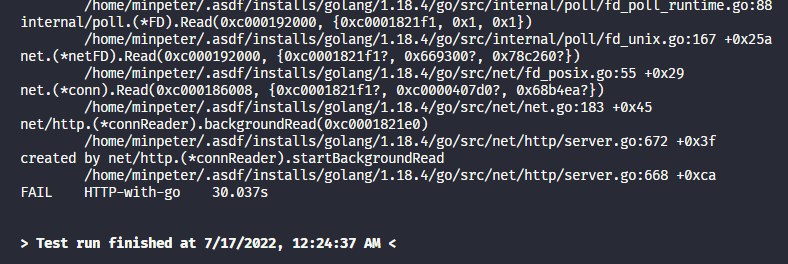
With the test maximum time set to 30 seconds, you can see it terminates at 30 seconds with an error. The book describes this as "Go's test runner timed out and aborted the test, printing a stack trace."
Now let's add a timeout to the connection using a deadline context, and also implement canceling the connection with a cancel function after timeout.
The following adds a feature to timeout the request if there's no response from the server for 5 seconds:
func TestBlockIndefinitelyWithTimeout(t *testing.T) {
	ts := httptest.NewServer(http.HandlerFunc(blockIndefinitely))
	ctx, cancel := context.WithTimeout(context.Background(), 5*time.Second)
	defer cancel()

	req, err := http.NewRequestWithContext(ctx, "GET", ts.URL, nil)
	if err != nil {
		t.Fatal(err)
	}

	resp, err := http.DefaultClient.Do(req)
	if err != nil {
		if !errors.Is(err, context.DeadlineExceeded) {
			t.Fatal(err)
		}
		return
	}
	_ = resp.Body.Close()
}
The execution result is as follows:

Finished within 5 seconds and automatically canceled, so no error is printed.
Or like the following code:
Disabling Persistent TCP Connections
Work in progress...
Published:
Modified: