AWS - IAM
CLI, API, or CodeDeploy... IAM frequently appears when you need to do something in AWS. Let's take a quick look at it!
Translated by Claude Opus 4.5
AI-generated content may be inaccurate or misleading.
Introduction to IAM
The main purpose is to manage user accounts, a permission management solution that allows you to manage users and their access levels and permissions.
It provides fine-grained access control for all of AWS. With IAM, you can specify who can access services and resources and under what conditions. IAM policies allow you to manage permissions for your workforce and systems to ensure least privilege.
This is the description on the AWS IAM dashboard.
IAM stands for Identity and Access Management and uses a key-shaped logo.

IAM is a service(?) that manages sub-accounts with equal or lower permissions than the root account. Usage is unlimited and free, and there's no limit on account creation.
The Need for IAM
Now we know that IAM is a service that manages users who can access AWS. So why do we need to create multiple additional accounts and maintain them with least privilege?
Although not precise, let me make an assumption based on my understanding. Let's say you run a company. Hmm... let's just assume you're the CTO. And if that company provides services using the cloud, especially using AWS, you would create the company's AWS Root account. I'm not sure yet, but you'd probably create an account using something like a corporate card. The company would have various development departments. The AWS resources that each department handling different parts of development needs to manage would be different. If a department receives more management permissions than necessary, there's no need for it, and it could accidentally damage another department's services through wrong access.
Also, if you're developing a service and for some reason you've written your AWS access key in a .env file.
And if you forgot to write the .gitignore file when uploading to GitHub and uploaded the .env file as is...
And if you didn't use IAM and the Root account access key was exposed, you could become the protagonist of stories like this.
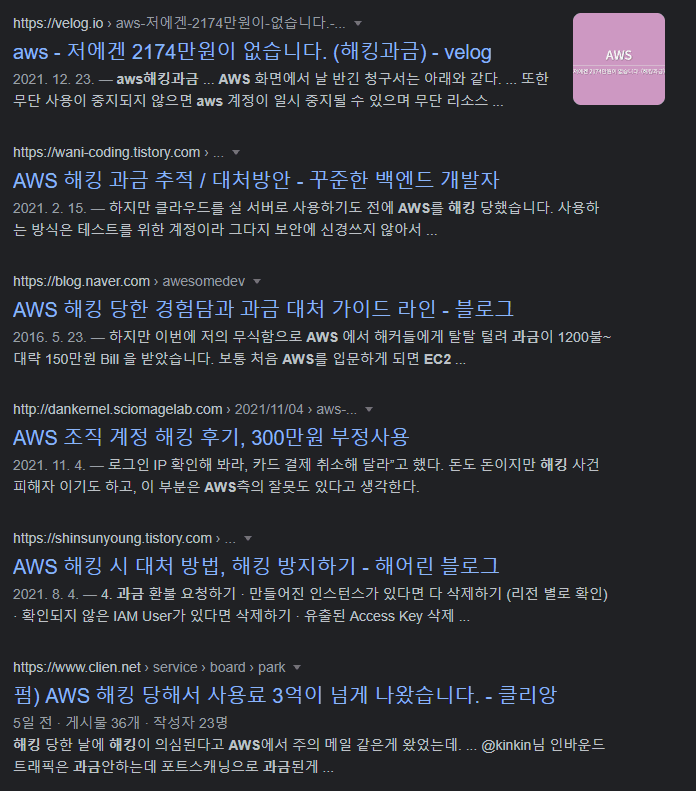
Of course, there are different situations, but the common point is that keys were leaked through hacking or mistakes. IAM exists to prevent such situations or reduce damage.
This was an assumption about why IAM user accounts are necessary.
IAM Credential Types
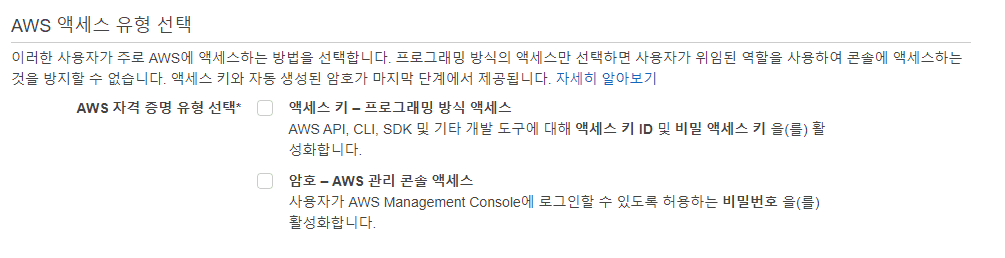 There are 2 types of IAM AWS credential types.
Programmatic access using access keys, and AWS Management Console access using passwords.
From now on, I'll call them key-based and password-based respectively.
There are 2 types of IAM AWS credential types.
Programmatic access using access keys, and AWS Management Console access using passwords.
From now on, I'll call them key-based and password-based respectively.
You can select both types simultaneously, and you can choose based on the reason and environment for use.
IAM - Password-Based
Uses password as the authentication method to access the AWS Management Console.
IAM user accounts can access the web dashboard and control services like a Root account, but unlike the Root account which has all permissions on the account, they can manage with limited permissions applied by the Root account or higher-privilege groups.
IAM - Key-Based
Uses Access ID and Secret Access Key as authentication methods to access AWS API, AWS CLI, and AWS SDK.
If only programmatic access is enabled, you cannot access the management console, but you can perform tasks within the given permissions in API/CLI/SDK. This is probably the way most people first encounter IAM. (Getting started with AWS CLI, programming with AWS SDK... because its use is almost mandatory compared to the password method)
Things That Make IAM Account Management Easier
There are numerous permissions in IAM, and as organizations grow, there will be shared permissions for specific groups and special permissions needed for specific users. Let's learn about features that help with IAM account management that could easily become complex!
User Groups
A user group is a collection of IAM users. You can use groups to specify permissions for a collection of users.
A group that gathers users. Literally, by grouping users who share similar roles together and setting policies shared by the group, you can manage policies at the group level.
Users
An IAM user is an identity with long-term credentials used to interact with AWS in an account.
The thing that provides the actual means of access. Has long-term credentials in contrast to roles, which I'll explain later. Receives the policies of the user group they belong to and their own unique permissions.
Roles
An IAM role is an identity with specific permissions that has short-term credentials. Trusted entities can assume roles.
To be honest, I'm not sure about this one. It seems like temporary permissions where if a user exists and has sufficient permissions, they can be delegated a role needed for a task, perform the necessary work, and return the role when done. I'll try to do a separate post on IAM roles later.
Policies
A policy is an object in AWS that defines permissions.
A policy is a JSON document that specifies which users can access AWS resources and what actions they can perform on those resources. It's said that you can define permissions by attaching policies to identities or resources. Hmm... I'll try to do a separate post on how to write policies as well.
Published:
Modified: